SDK Overview
Software development kit for writing userland programs for the r2 kernel.
The SDK lives in the rou2exOS-apps repository, next to the programs built with it. Every language has its own workspace in the repository root, and three of them carry a library that implements the kernel ABI so an application does not have to:
| Language | Library | What it gives you | Page |
|---|---|---|---|
| C | c/libcr2 |
Syscall wrappers, printf, strings, a TCP/IP stack (ARP, ICMP, DHCP, TCP) |
libcr2 |
| C++ | cpp/libc++r2 |
A freestanding C++23 runtime and standard library: containers, strings, formatted output, expected, coroutines, filesystem, graphics, input |
libc++r2 |
| Go (TinyGo) | go/libgor2, go/r2net, go/tinygo-r2 |
The syscall binding, a TCP/IP stack with DNS and an HTTP/1.0 client, and the TinyGo target that makes Go run at all | libgor2 |
C, on r2 |
c/tcc |
TinyCC running on r2 itself, with a small C library (stdio, printf, strings, time, setjmp), its headers and crt files, and libcr2, in the boot image |
TCC |
| NASM, Rust | — | Minimal examples calling int 0x7f directly |
— |
The programs shipped with the kernel are listed on the Application Suite page.
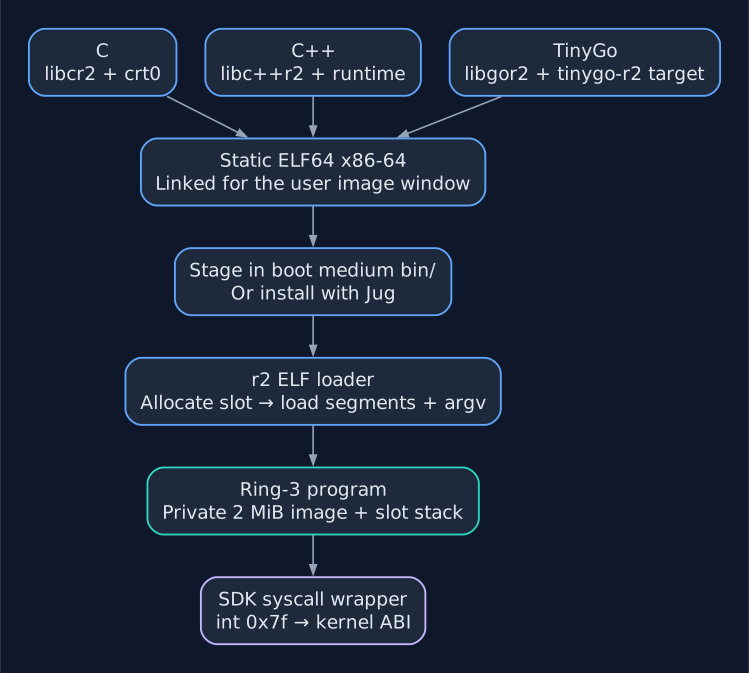
Build-to-execution path shared by the three SDKs. Each language supplies its own runtime and wrappers; the resulting programs use the same loader and ABI.
Use Memento for the desktop, Jug for installing and restarting programs, and Publishing Jug Programs for the SSH publication workflow. Kernel implementations are indexed in Kernel Internals; request layouts are in the ABI Specification and Type Definitions.
Repository Layout
rou2exOS-apps/
├── c/
│   ├── libcr2/          the C library (+ _crt0.asm)
│   ├── tcc/             TinyCC on r2, and the C library its programs use
│   ├── linker.ld        shared linker script for C programs
│   ├── Makefile.tmpl    shared build rules for C programs
│   └── <app>/           one directory per program
├── cpp/
│   ├── libc++r2/        the C++ runtime and standard library
│   ├── example-print/   the minimal C++ program, no library
│   ├── memento-hello/   the Memento GUI demo
│   ├── r2web/           the browser process behind Memento's Web window
│   ├── jug/             the program manager
│   └── mpegplay/        the MPEG-1 player behind Memento's Video window
├── go/
│   ├── libgor2/         the syscall binding
│   ├── r2net/           the TCP/IP stack
│   ├── r2tls/           HTTPS over r2net (BearSSL through Cgo)
│   ├── tinygo-r2/       the TinyGo target (runtime hooks, r2.ld, r2.S)
│   ├── Makefile.tmpl    shared build rules for Go programs
│   └── <app>/           one directory per program
├── bsh/               example scripts for the shells (.BSH)
├── nasm/
└── rust/
The kernel's Makefile expects this repository to be checked out as ../r2_app next to the kernel tree: make build copies the built binaries into iso/bin/, and make build_floppy copies data files and some binaries onto fat.img.
What Every Program Has to Respect
These rules come from the kernel, not from any one library, and apply whichever language a program is written in.
Executable format
Programs are statically linked elf64-x86-64 executables with a .ELF extension. The kernel loads PT_LOAD segments only; there is no dynamic linker, no relocation, and no C runtime in the kernel, so every program brings its own start-up code (_crt0.asm in C and C++, r2.S in Go).
On entry the kernel leaves a System V argv frame on the initial stack:
[rsp+0]   argc
[rsp+8]   argv[0]
[rsp+16]  argv[1]
...
The initial stack is small and sits in memory shared with other processes, so every runtime reads argc/argv and immediately switches to a private stack inside its own image.
Memory map
Each process gets a private 2 MiB frame mapped at 0x600_000, which has to hold code, data, .bss, the private stack and (for C++ and Go) the heap. The loader skips segments outside 0x600_000..0xA00_000, but only
0x600_000..0x800_000 is private image memory; keep image segments below
0x800_000 to avoid the shared initial stacks.
0x400_000  ┌──────────────────────────────┐
           │ initial stacks, slots 16-31  │  shared, identity-mapped
0x600_000  ├──────────────────────────────┤
           │ .text .rodata .data .bss     │  private to this process
           │ private stack, private heap  │
0x800_000  ├──────────────────────────────┤  <-- stay below this line
           │ initial stacks, slots 0-15   │  shared, identity-mapped
0xA00_000  ├──────────────────────────────┤  <-- segments may not end past here
           │ VGA window (syscall 0x14)    │
0xC00_000  ├──────────────────────────────┤
           │ kernel userland heap, 4 MiB  │  shared by every process
0x1000_000 └──────────────────────────────┘
See Memory Overview for how the frame is backed physically.
Pointers passed to syscalls
Every syscall that takes a pointer checks the whole buffer it will touch. The
buffer must lie wholly inside the process image and initial stacks
(0x400_000..0xA00_000), the initial shared user heap
(0xC00_000..0x1000_000), or its mapped extension; otherwise the call returns
InvalidInput (0xfc) or its documented error value. A buffer cannot cross a
gap between regions. Heap memory can be handed to syscalls directly, so a
program too large to keep its heap in the image can use libc++r2's
R2_HEAP_ARENA_KERNEL or R2_HEAP_ARENA_GROWING (Memento uses the
latter), or KMalloc with libgor2.KBytes in Go. See
Pointer Arguments.
Calling convention
| Register | Role |
|---|---|
RAX |
syscall number in, return value out |
RDI |
argument 1 |
RSI |
argument 2 |
RCX |
optional argument 3: capture metadata or tunnel frame length |
R9 |
clobbered by every syscall |
Most syscalls take two arguments. 0x1d reads RCX as a metadata pointer only
with its opt-in bit set; 0x44 always reads it and requires a frame length for
operation 3 and zero otherwise. Every register except R9 and RAX is
preserved. See the Syscall Specification.
Other constraints
- 8.3 file names. Use program basenames of at most 8 characters without the extension. The ELF loader and syscall
0x2aalso accept an absolute path of at most 63 characters with a basename of at most 12; relative paths containing/are rejected. The rescue shell restrictsbg/fgexecutable tokens to 8 characters andruntokens to 12. Files on FAT volumes use 8.3 names. - Floating point is saved across a context switch. The timer interrupt saves each process's x87/MMX/XMM state with
fxsave64and restores it withfxrstor64, and a new process starts with a clean state (exceptions masked, round to nearest), so SSE and x87 code, including whatgcc -O2emits, is safe in any number of processes. AVX is not enabled (CR4.OSXSAVEstays off), so AVX instructions fault. See Scheduler. - At most 32 processes exist at once, including the kernel's own tasks (
kmain,kclock,kshell, andinit_rcwhile it runs; the graphics kernel on a framebuffer starts neitherkclocknorkshell). - No threads, no signals, no
mmap, no file descriptors.
Getting a Program Onto the Machine
bg <name> / fg <name> search:
/mnt/tmp/jug, where Jug installs downloaded updates,- the shell's working directory (on a FAT volume, ISO, or tar archive),
/mnt/tar/bin, then/mnt/iso/bin.
An absolute path selects that file directly on FAT, ISO9660 or tar, bypassing
the search and leaving the working directory unchanged. . and .. directory
components are normalized. For example, syscall 0x2a with
/mnt/tar/bin/hello.elf selects the shipped copy even if Jug has installed an
update. See
Execute ELF for argument limits.
So a program can either be copied onto the floppy image:
mcopy -o -i fat.img hello.elf ::HELLO.ELF
or into iso/bin/ in the kernel tree before make build, which makes it available from any directory. Then, in the kernel shell:
fg hello
bg garn --config /mnt/fat/GARN/GARN.CFG
Programs started from INIT.RC at boot use the same commands (see Build & Run).
Toolchain
| Tool | Needed for |
|---|---|
gcc / g++ (host, x86-64) |
C and C++ |
nasm |
_crt0.asm for C and C++ |
llvm-objcopy |
.bin flat images (optional) |
| Docker | Go — the TinyGo image is built from go/tinygo-r2 |
mtools |
copying files onto fat.img |
qemu-system-x86_64 |
running |
Related documentation: Documentation home, Build and Run, ABI Specification.