Publishing Jug programs over SSH
Run utils/jug-publish.sh in the kernel repository to publish built ELF programs
through your SSH agent. It generates and commits sums.txt itself. The defaults
match configs/jug.cfg:
| Setting | Default |
|---|---|
| Remote directory | /mnt/cephfs/cdn/content/jug |
| Public repository | https://cdn.vxn.dev/jug |
| Catalog | sums.txt |
| Batch input | iso/bin/*.elf (case-insensitive extension) |
The developer machine needs Bash, Python 3.9+, and OpenSSH. The swarm node
needs Python 3.9+ and write access to the remote directory as your SSH user.
The receiver is sent with each SSH invocation; nothing is installed on the
node. The filesystem must support advisory locks, hard links, atomic rename,
and fsync. All objects and staging files stay on the same CephFS mount.
First publication and batch updates
Replace user@swarm-node with your SSH destination or an existing SSH config
alias. Load your key into the agent and establish the host's trusted SSH host
key normally before publishing. The utility uses batch authentication, your
SSH config, and your local agent; it does not forward the agent to the node.
export JUG_SSH_HOST=user@swarm-node
ssh-add -l

# Validate the built binaries and show their checksums; no connections or writes.
./utils/jug-publish.sh --all --dry-run

# Publish the whole staged bin directory and check it through the public CDN.
./utils/jug-publish.sh --all
iso/bin becomes /mnt/tar/bin on USB boots and /mnt/iso/bin on CD boots.
Rebuild changed applications and refresh the ISO staging tree through the
normal make build / make build_iso workflow before publishing. The publisher
does not compile applications. To use another built bin directory:
./utils/jug-publish.sh --host cdn-node --all --bin-dir /path/to/bin
Batch publication adds or updates the selected programs and retains other catalog entries. It does not delete programs that disappear from your local bin directory. Before committing, the receiver verifies every retained binary too; a missing or damaged retained program stops the publication.
Update one program
Pass one or more freshly built ELF files. Other programs stay listed:
./utils/jug-publish.sh --host cdn-node ../r2_app/c/tnt/tnt.elf

# A source filename longer than r2's eight-character program name needs an alias.
./utils/jug-publish.sh --host cdn-node --name memento \
  ../r2_app/cpp/memento-hello/memento-hello.elf
Memento can be published and installed like the other programs. On a system
booted with the updated graphics kernel and Memento, hosted Jug offers a
coordinated relaunch after installation. Confirm with Y after saving work:
the desktop closes its windows and hosted children, then the kernel launches
the downloaded version without rebooting. SESSION.CFG and the downloaded
programs remain on the RAM disk; log in again with the existing credentials.
For the first deployment of this support, boot the rebuilt image once. See
Jug for compatibility and relaunch behavior.
Each program must be a statically linked r2 ELF64 x86-64 executable, at most
4 MiB, with loadable segments inside r2's process window. Program names are
case-insensitive, at most eight characters, using letters, digits, _, or -.
--name applies to one file only. Run ./utils/jug-publish.sh --help for flags;
--remote-dir and --repo-url override the destination together when hosting
elsewhere. Configure Jug's repo to match if you change the public root.
Publication order and recovery
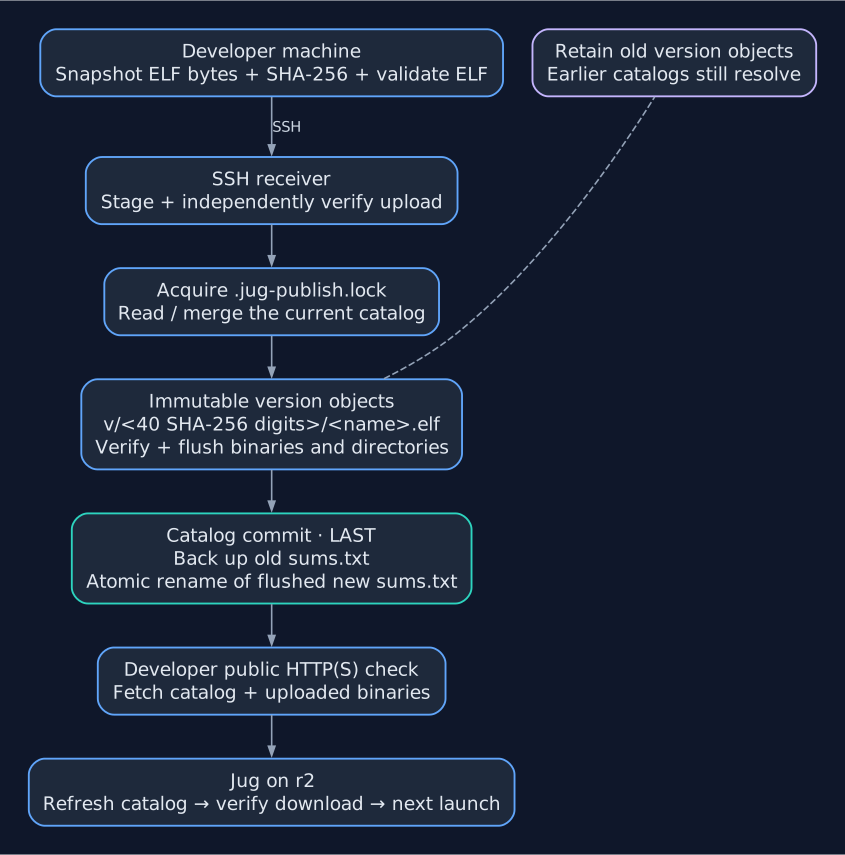
Publication order. Interruptions before the catalog rename leave the previous catalog live. Public verification runs after commit, so its failure does not undo a completed publication.
The publisher snapshots local bytes before connecting, computes SHA-256, and
checks the ELF structure. The receiver stages and independently verifies the
upload, then acquires .jug-publish.lock before reading and merging the current
catalog. A busy lock reports an error; retry after the other publication ends.
Each version is created without overwriting an existing file at
v/<first-40-SHA256-digits>/<program>.elf. The full 64-digit SHA-256 and size are
verified even when that path already exists. The shorter directory name keeps
paths within Jug's 63-character limit; a prefix collision fails safely.
The receiver flushes binaries and directories, saves the previous catalog in
.jug-history/, then atomically renames a flushed temporary catalog to
sums.txt last. Its format is compatible with Jug:
# updated YYYY-MM-DD HH:MM:SS UTC
# SHA-256  bytes  path (immutable versions)
<64-digit SHA-256>  <byte count>  v/<40-digit prefix>/tnt.elf
Old versions are retained, so a Jug client using an earlier catalog can still
download the bytes matching its checksum. Existing flat catalogs, including
plain sha256sum output, are migrated to version paths; the original flat
files are also retained. Interruptions before the catalog switch leave the
previous catalog live, though an unreferenced version directory can remain.
Do not overwrite files inside v/, delete old versions while clients may have
cached catalogs, or remove the persistent lock file.
By default the utility downloads the public catalog and every uploaded binary
over HTTP(S) and verifies their checksums after the SSH commit. HTTPS uses the
developer machine's certificate trust store. --no-verify skips this check
when the public endpoint cannot be reached from the developer machine.
Exit 0 means publication and the requested checks succeeded. Exit 1 means
local or SSH publication failed; if the SSH connection was lost near the
commit, inspect the public catalog before retrying. Exit 3 means the node
committed successfully, but public CDN verification failed. Check the edge
cache, routing, and mounted directory before retrying. Repeating the same
upload reuses the immutable binary objects.
The successful output prints the previous catalog's private backup path. To
roll back, hold the same .jug-publish.lock, copy that backup to a temporary
file in the repository, set mode 0644, and atomically rename it over
sums.txt; then verify the public catalog. The retained versions make the old
catalog usable without restoring binary files.
Nginx origin and edge proxy
The Nginx service serving files must mount CephFS content at its configured document root. Publishing onto one swarm node's host filesystem works only when the serving tasks actually see that shared content. The SSH path is a host path; a container's mount path can differ.
Use the server-context snippets in
configs/jug-origin.nginx.example
on the service reading files and
configs/jug-edge.nginx.example
on the public proxy. Adjust the origin mount path and upstream name to your
deployment, and integrate the locations with your existing configuration.
Test with nginx -t before reloading each service.
sums.txt must be fetched fresh: turn off proxy caching for its exact URL and
send Cache-Control: no-store. Nginx's proxy_cache off also disables an
inherited cache. On the file-serving origin, disable open_file_cache for
the catalog so a cached descriptor cannot serve the previous inode after a
rename. Version URLs can use long-lived caching because their contents never
change. See the official
proxy cache documentation,
response headers documentation,
and open file cache documentation.
Block /jug/.jug* on both layers: it contains staging data, the lock, and
private history. The examples do so independently of other dotfile rules.
Do not apply long-lived caching to errors or inherit negative caching for
new version URLs.
On r2, fetch the new catalog with Refresh in the Jug window or fg jug
update, then Download / fg jug install tnt (or fg jug upgrade). A
running program changes only after it exits and relaunches or you use Jug's
Restart action / fg jug restart tnt.
Development checks
The tests run the complete SSH receiver through a local SSH substitute,
including all current iso/bin binaries. They cover old version retention,
legacy catalogs, corrupted and interrupted transfers, locks, commit failures,
quoting, and public CDN verification. No real node is contacted.
bash -n utils/jug-publish.sh
PYTHONDONTWRITEBYTECODE=1 python3 -m unittest discover -s tests/jug_publish -v
Related documentation: SDK Overview, Jug Program Manager, Build and Run, Memento.