Jug (program manager)
Jug is implemented in the apps repository's cpp/jug, using libc++r2. Open the
Jug desktop icon to browse the CDN catalog, download ELF programs, inspect
their checksums and running PIDs, and restart their instances. The window is
hosted by JUG.ELF in a separate process, with Memento forwarding its input and
displaying its frames.
The default root is https://cdn.vxn.dev/jug, with a sums.txt catalog. The
ISO build installs /mnt/tar/opt/jug/jug.cfg (or /mnt/iso/opt/jug/jug.cfg on
the CD). An editable /mnt/fat/JUG.CFG takes precedence. Configuration keys
are repo, list and insecure; HTTPS checks certificates by default using
Memento's CA bundle. Run the eth driver before fetching packages.
On the console:
fg jug update
fg jug list
fg jug install tnt
fg jug upgrade
fg jug restart tnt
fg jug remove tnt
Downloaded programs live at /mnt/tmp/jug/TNT.ELF. The kernel searches them
before the working directory and the boot medium's bin directories. Jug checks
the complete SHA-256, optional byte size and ELF structure, then stages and
reads back the download before replacing the old copy. A light registry records
each program's checksum; the catalog shows its publication timestamp, name,
size and checksum. The RAM disk and downloaded updates are reset at reboot.
Updates affect subsequent launches. Restart stops every running instance
and starts it with its original arguments, obtained through syscall 0x41.
Jug leaves an instance running if its command line cannot be recovered and
protects Jug itself. Remove restores the shipped copy
for subsequent launches.
Memento uses a coordinated relaunch instead of the ordinary instance restart.
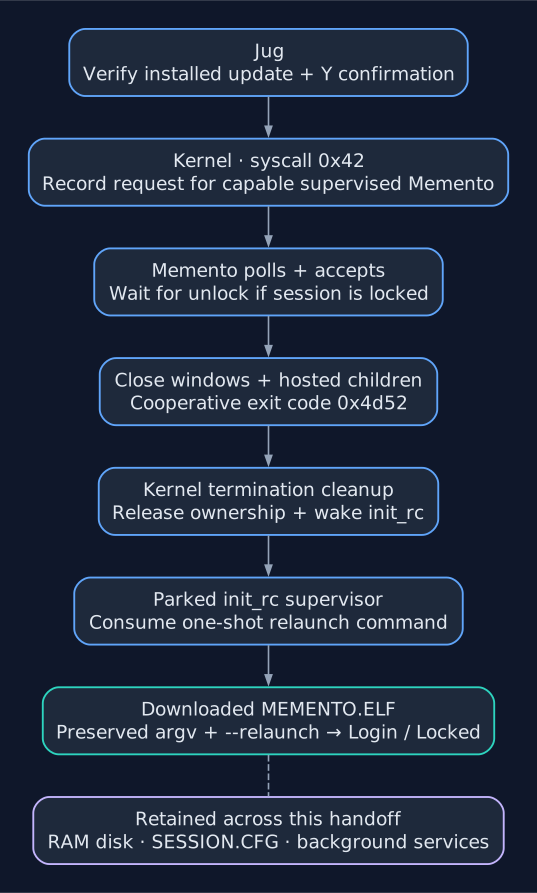
Desktop handoff after confirmation. RAM-disk files and background services survive; open windows and their unsaved state do not.
After downloading its update, Jug offers Y / N to relaunch it; Restart/R
offers the same confirmation later. Save work first: all Memento windows close,
and their hosted processes stop before the desktop exits. The graphics kernel's
session launcher then starts /mnt/tmp/jug/MEMENTO.ELF, preserving its arguments
and adding --relaunch. The RAM disk, Jug registry, downloads and
/mnt/tmp/SESSION.CFG survive; the replacement reads those credentials and
returns to the Locked dialog when saved credentials exist, or Login otherwise.
Open windows and unsaved buffers are not restored. Other
background services continue running, and INIT.RC is not run again.
This requires the updated graphics kernel and a running Memento that supports
syscall 0x42. Boot the new image once to enable it. Older kernels or Memento
versions reject the request without stopping the desktop. Jug rechecks the
installed download's size and full SHA-256 before requesting a relaunch.
fg jug restart memento requests the same handoff from the console.
In the window, Tab cycles between the program list and the six bottom buttons; Shift+Tab goes backward. The focused button is highlighted. Enter or Space activates it, and Left/Right move between buttons. Up/Down, Page Up/Down, Home/End, or clicking a row return focus to the list, where Enter downloads the selected program. Restart requires Y to confirm.
To publish over SSH from the developer environment, use
utils/jug-publish.sh --host user@swarm-node --all in the kernel repository.
It uploads the staged iso/bin binaries to immutable version URLs, generates
sums.txt, and atomically switches the catalog after verifying the files.
Pass a single ELF filename to update one program while retaining the others.
See Publishing Jug programs for SSH-agent setup, Nginx
examples, recovery, and the default CephFS destination.
For a manually managed server, make sums DIR=/path/to/jug in cpp/jug
generates a catalog with SHA-256 bytes path lines; paths are relative to the
list. Plain sha256sum output is accepted too. Set list = list.txt to use
that filename instead. See the apps repository's cpp/jug/README.md for
configuration, window shortcuts and tests.
Related documentation: SDK Overview, Publishing Jug Programs, Memento, Desktop Relaunch ABI.